
The short version
Google Ads can now read offers off your website and put them in your ads without you creating the asset. If you run Search or Performance Max with Location Assets, this can already be live in your account.
| Question | Answer |
|---|---|
| What is it? | A new account-level automated asset called Automated promotions |
| What does it do? | Extracts offers from your landing pages and shows them as promotion assets |
| Where does it show? | Eligible Search and Performance Max ads |
| Do you approve the wording? | No |
| Can you turn it off? | Yes, in account-level automated asset settings |
| How urgent? | Check within the week if you run retail, ecommerce or local service accounts |
In this article
- What changed
- Who is affected
- Why this matters more than the usual automation story
- How to audit your account today
- Opt in or opt out: a decision table
- How to measure the impact
- The seven-day plan
- FAQs
What changed
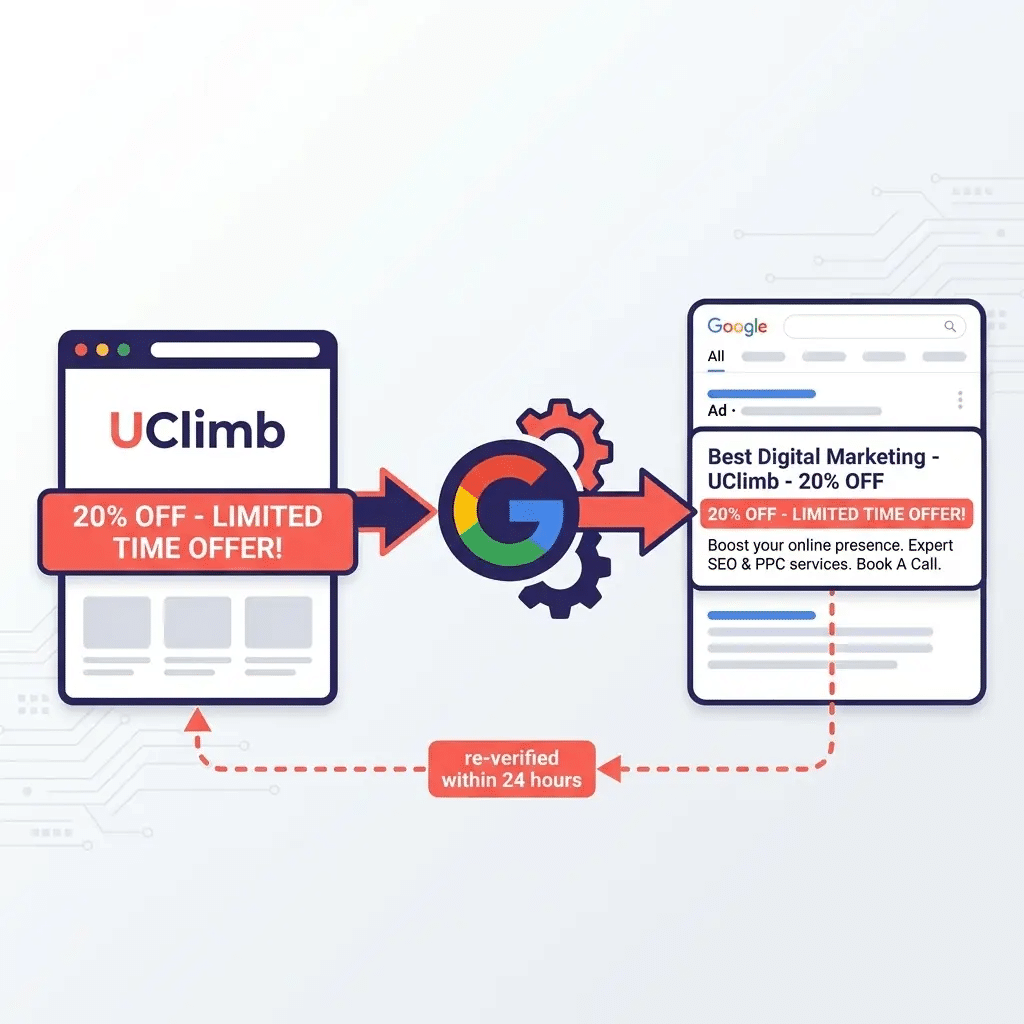
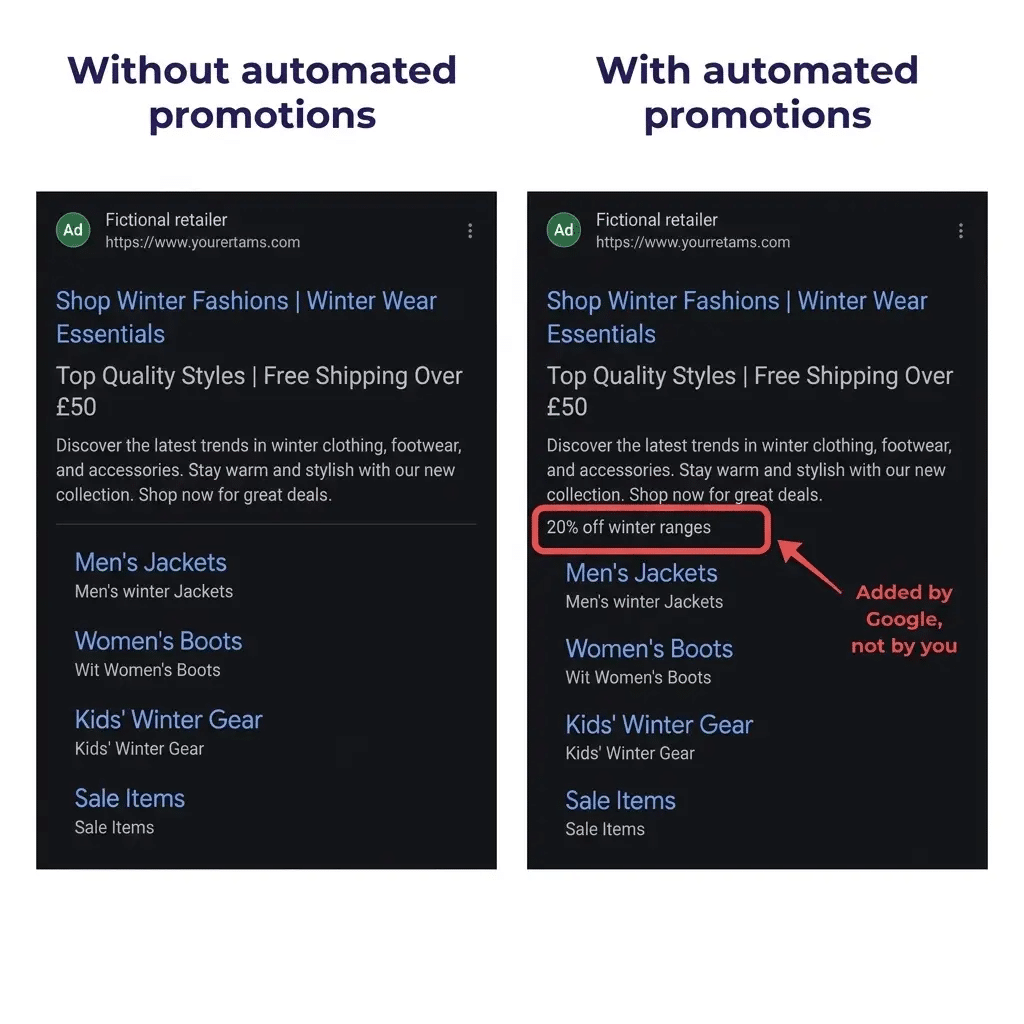
Google Ads has introduced a new account-level automated asset called Automated promotions. It scans your landing pages, finds offers such as “20% off” or “buy one get one free”, and attaches them to your Search and Performance Max ads as promotion assets.
You do not build the asset. You do not approve the wording. If the setting is on and your campaign is eligible, it can simply appear.
The change was spotted inside the Google Ads interface by Hana Kobzová of PPC News Feed and reported by Search Engine Roundtable on 7 September 2026.
There was no Google blog post. No announcement email. No rollout schedule. It arrived as a help-centre document and an interface change, which is how most of the automation that genuinely affects your account tends to arrive.
How this differs from previous automated assets
Automated promotions sits inside account-level automated assets, alongside dynamic sitelinks, dynamic callouts, dynamic images and automated locations. The family is familiar. The mechanism is not.
| Asset type | What it extracts | Risk level |
|---|---|---|
| Dynamic callouts | Descriptive claims such as “25 years of experience” | Low to moderate |
| Dynamic sitelinks | Page names and navigation paths | Moderate |
| Dynamic images | Imagery from your landing pages | Moderate |
| Automated promotions | Commercial offers and discounts | High |
Previous automated assets repackaged description. Automated promotions extracts a commercial offer and presents it with the promotional styling that has always signalled a deliberate, advertiser-approved deal.
Google’s guidance to advertisers is essentially to keep website promotional details current, or to upload promotions manually where exact control is required.
Eligibility criteria
| Requirement | Detail |
|---|---|
| Campaign type | Active Search or Performance Max |
| Location Assets | Attached to the campaign |
| Manual promotions | None already running on that campaign |
| Policy | Offer and account must comply with Google Ads policies |
| Account setting | Account-level automated assets enabled |
The Location Assets requirement is the tell. Google is optimising this for local store visits and omnichannel retail, which is exactly where offer accuracy carries the most commercial and legal weight.
It appears and disappears
Detected promotions are short-lived by design. They surface for under 24 hours at a time, and Google re-verifies the offer before it can appear again.
That sounds reassuring. The practical effect is the opposite. An asset that reappears intermittently is harder to notice, harder to attribute and far easier to miss in a monthly review.
Who is affected
| Business type | Exposure | Why |
|---|---|---|
| Retail and ecommerce with physical stores | High | Frequent offers, Location Assets attached, PMax usually running |
| Local service businesses | High | Introductory offers, free surveys and seasonal discounts on site |
| Franchise and multi-location brands | High | Local pages carry offers head office never signed off |
| Regulated sectors (finance, health, legal) | Critical | Promotional wording must match approved copy exactly |
| B2B and lead generation | Low | Usually no Location Assets attached |
| Accounts with manual promotions everywhere | Low | Manual promotions block eligibility |
Work down that table in order. If you manage a portfolio, the top three rows are where fifteen minutes today saves a difficult client conversation later.
Why this matters more than the usual automation story
It is easy to file this alongside every other “Google turned something on” story. That would be a mistake, for four reasons.
1. Your website is now ad copy
Any offer sitting on a landing page is a candidate for extraction.
The seasonal banner nobody removed. The “summer sale” block a developer hid rather than deleted. The offer that expired in March but still lives on a secondary category page.
None of those were written as ad copy. None went through the approval process your ad copy goes through.
2. Qualified offers can lose their qualifications
Real promotions carry conditions: minimum spend, selected lines only, in-store only, new customers only, subject to availability.
An extracted asset compresses that into a short promotional string. If the qualification is what makes the offer accurate or lawful, and the qualification does not survive the compression, the problem now lives in your ad rather than on your site.
3. UK advertisers carry the regulatory risk, not Google
Under the CAP Code, the advertiser is responsible for the claim.
| Code section | What it covers | Relevance here |
|---|---|---|
| Section 3 | Misleading advertising, pricing, availability, substantiation | Extracted offers must be accurate and available |
| Section 8 | Promotional marketing | Governs how promotions are administered and publicised |
Paid search sits squarely inside the Code’s scope, and the ASA’s remit was extended in 2011 to cover claims companies make on their own websites.
That matters more than usual here, because with automated promotions the website claim and the ad claim become the same claim. Responsibility under the Code sits with the advertiser regardless of how the copy was generated, exactly as it does for automatically created assets and dynamic keyword insertion.
For regulated sectors this is a compliance exposure, not a performance setting.
4. It changes your measurement baseline
A new asset type entering your ads shifts CTR, click composition and store-visit behaviour.
If you see a CTR lift in a retail account this month and you do not know this setting is live, you will attribute it to whatever you happened to change instead.
The honest counterweight
The upside is real. For a retailer with a well-maintained offers page and genuinely current deals, an extra promotional line at no build cost is a reasonable trade.
The question is whether your website is disciplined enough to be treated as an ad copy source. Most websites are not.
How to audit your account today
Fifteen minutes per account. Do it before your next reporting cycle, not after.
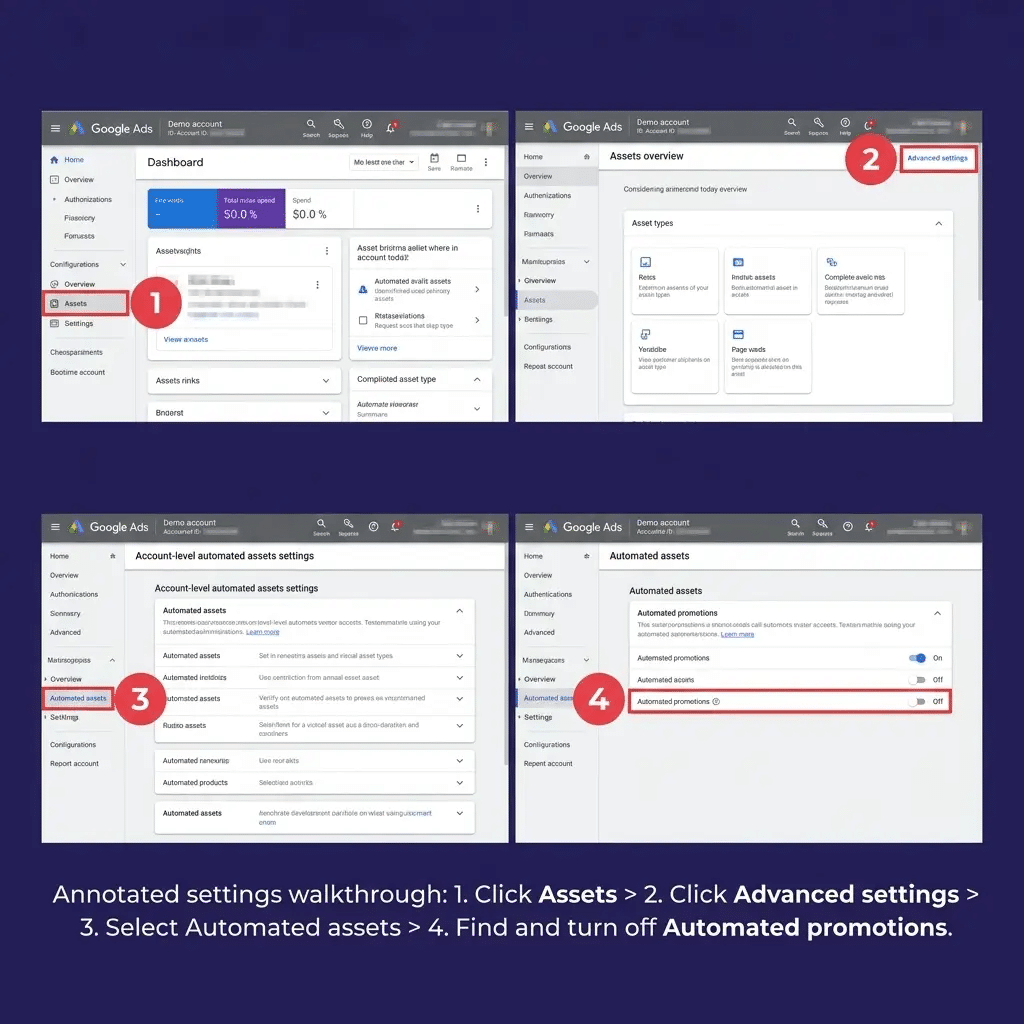
Step 1: Find the settings
- Open Campaigns > Assets
- Switch the Table view dropdown to Association
- Open the three-dot menu, select Account level automated assets
- Open the three-dot menu again, select Advanced settings
Every account-level automated asset is switched on or off here, including Automated promotions. If you have never opened this screen, assume the defaults are on.
Google documents the equivalent navigation in its account-level automated assets help article.
Step 2: Identify what Google has already created
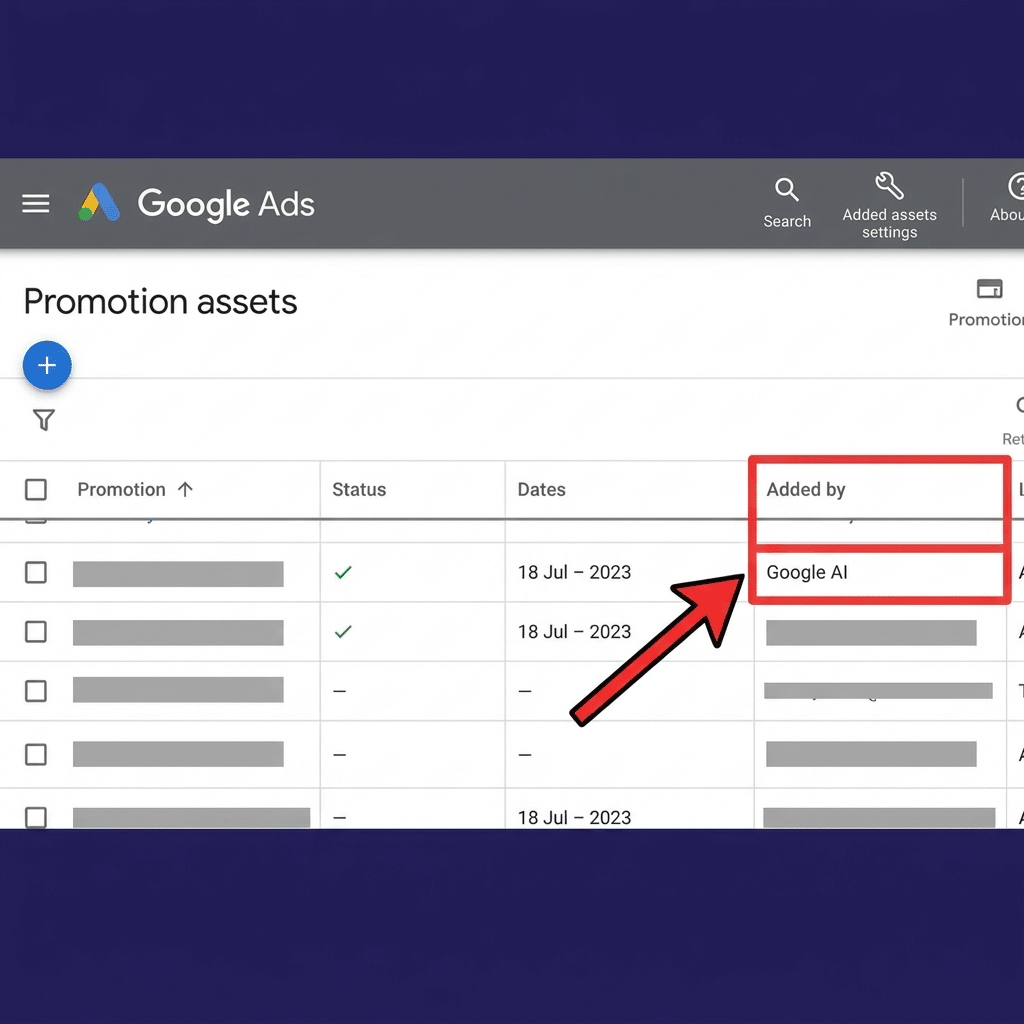
Go to your Promotion assets view and add the “Added by” column.
Assets generated by the system are labelled as added by Google AI rather than by a user. Sort by that column and you have an instant inventory of every promotion in your account that no human wrote.
Screenshot it. You want a dated record of what was live, particularly in regulated accounts.
Step 3: Audit the source, not just the asset
This is the step most people skip, and it is the one that separates real Google Ads management from box-ticking.
Crawl the site for live offer language and check every instance against reality.
| Check | What you are looking for |
|---|---|
| Still running? | Offers that ended but were never removed |
| Expiry stated? | Dates present, accurate and in the future |
| Conditions prominent? | Qualifying terms on the same page, not buried |
| Hidden or deleted? | Hidden content can still be readable |
| Orphan pages? | Old campaign landing pages still live and still indexed |
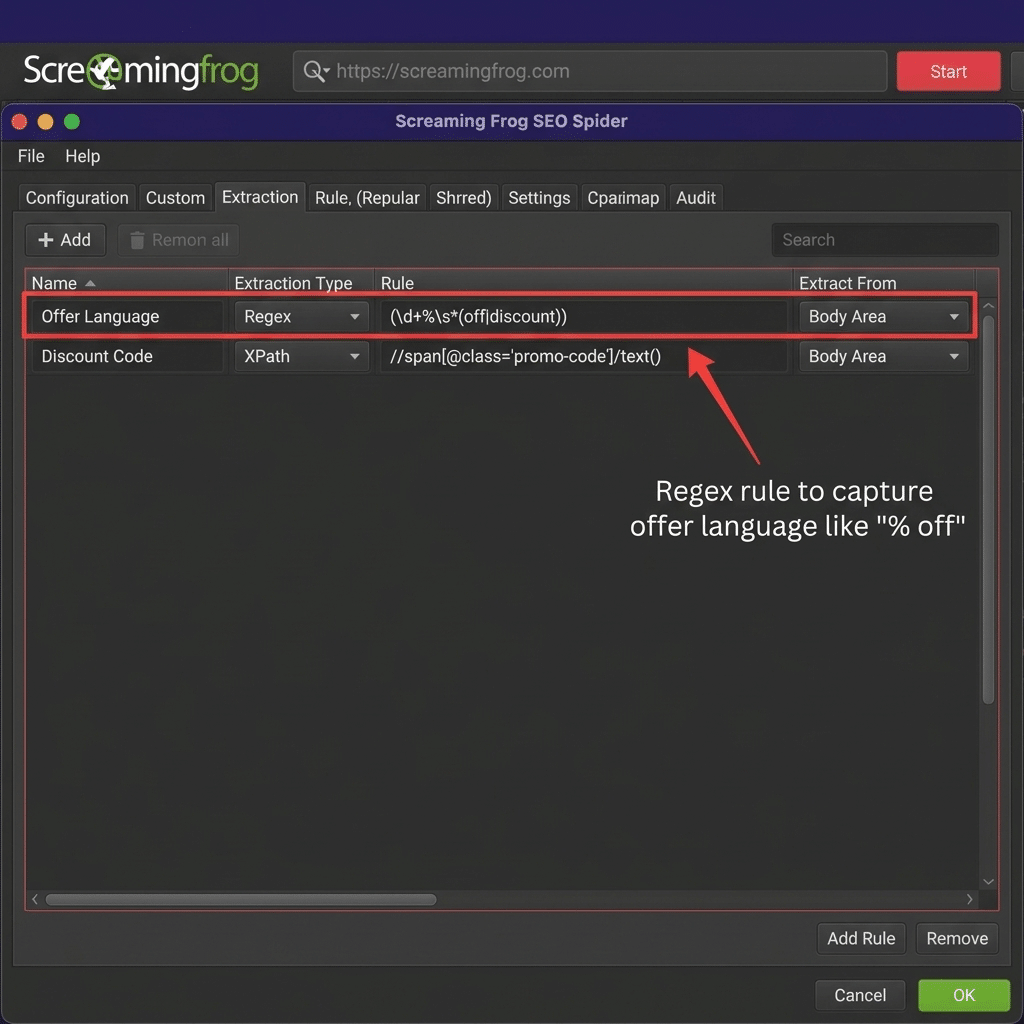
A site search combining your domain with terms like “% off”, “free”, “BOGOF” and “sale” will surface most of it in minutes. A crawler such as Screaming Frog with a custom extraction for offer patterns will surface the rest.
Opt in or opt out: a decision table
| Situation | Recommendation |
|---|---|
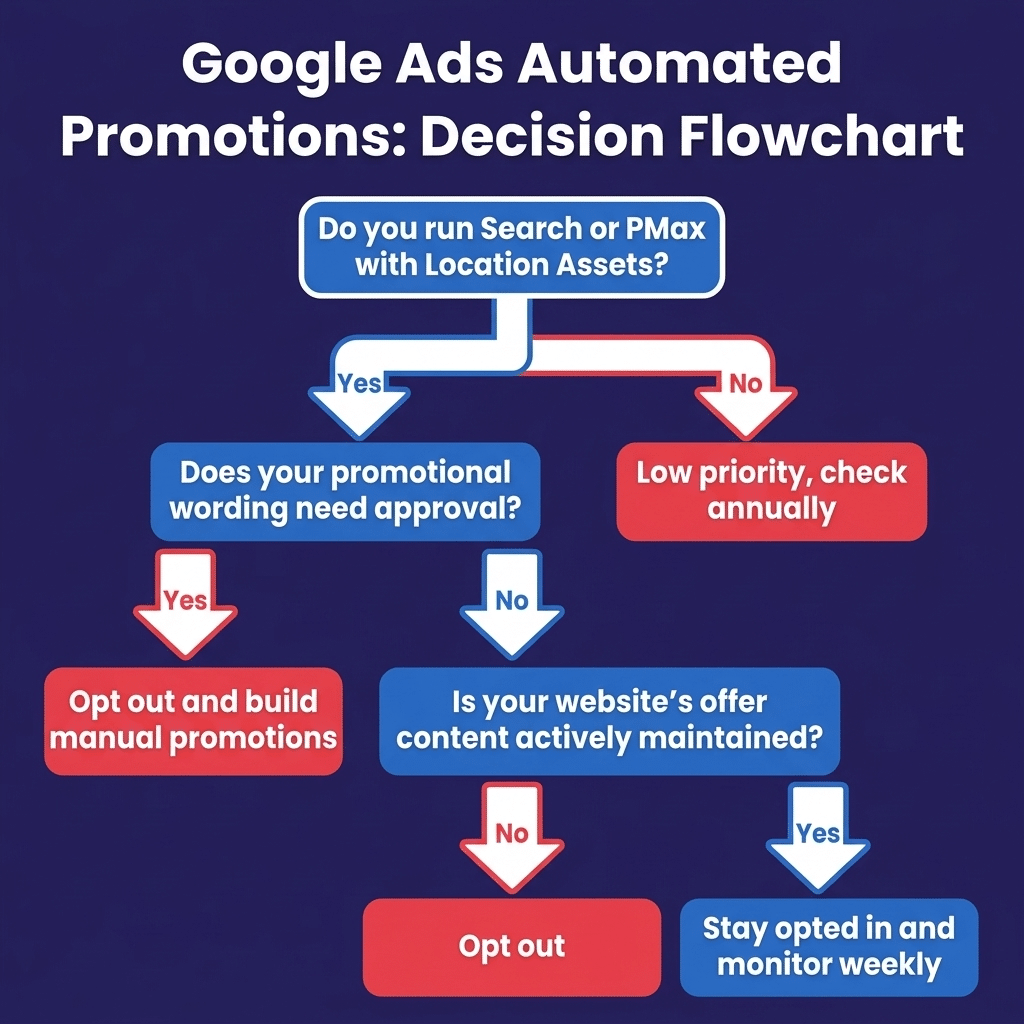
| Promotional wording needs legal or compliance sign-off | Opt out |
| Offers are complex, conditional or tiered | Opt out |
| Website is not actively maintained | Opt out |
| Site is managed by a third party you do not control | Opt out |
| Client operates in a regulated sector | Opt out |
| Offers are simple, current and centrally controlled | Stay opted in |
| Expired offers are removed from the site promptly | Stay opted in |
| Store visits and CTR are the primary objective | Stay opted in |
Where you need promotional coverage but not automation, do not leave it to chance. Build manual promotion assets with exact start dates, end dates, promotion codes and terms.
A campaign already running a manual promotion is not eligible for the automated version. A well-built manual promotion asset is therefore both better copy and a control mechanism.
How to measure the impact
Because these assets appear and disappear within a day, a monthly check is not enough.
| Action | Frequency |
|---|---|
| Check Promotion assets filtered by “Added by” | Weekly |
| Alert on significant campaign-level CTR movement | Automated rule |
| Segment reporting by click type | Every report |
| Review impressions, conversions, conversion value | Every report |
Judge the outcome on impressions, conversions and conversion value, not on promotion clicks in isolation.
Promotion clicks are a click-type reshuffle as much as they are incremental volume. Treating them as pure upside will overstate the benefit, and you will end up defending a number that does not hold.
The seven-day plan
| Day | Action | Output |
|---|---|---|
| 1 | Audit automated asset settings across all accounts | Record of current state per account |
| 2 | Export Promotion assets with the “Added by” column | List of system-generated assets |
| 3 | Crawl client sites for live offer language | Full inventory of on-site offers |
| 4 | Verify accuracy, expiry and qualifying terms | Escalation list of stale offers |
| 5 | Opt out on regulated and approval-sensitive accounts | Documented decision and rationale |
| 6 | Build manual promotion assets where needed | Approved promotions live |
| 7 | Set weekly monitoring and brief the client in writing | Client comms sent |
The wider pattern worth naming
Automated promotions is the latest step in a consistent direction. Google is progressively treating your website as an input to your advertising, not just a destination for it.
Dynamic callouts read your service list. Dynamic images read your imagery. Automated promotions reads your commercial offers.
The strategic implication is straightforward: landing page hygiene is now a PPC discipline, not just a web discipline.
The stale offer block that used to be a minor UX issue is now potentially live ad copy in a regulated market. Accounts where SEO, web development and paid media are handled separately, with nobody owning the overlap, are the accounts most exposed.
That overlap is exactly where our PPC agency services sit, because we run paid media alongside SEO and web development rather than in isolation from them.
Frequently asked questions
What are Google Ads automated promotions?
An account-level automated asset that extracts offers such as percentage discounts or buy-one-get-one-free deals from your landing pages and displays them as promotion assets on eligible Search and Performance Max ads.
How do I turn off automated promotions in Google Ads?
Go to Campaigns, then Assets, switch the table view to Association, open the three-dot menu, select Account level automated assets, then Advanced settings. From there you can turn off specific automated assets, including automated promotions.
How can I tell if Google created a promotion asset in my account?
Open your Promotion assets view and add the “Added by” column. System-generated assets are attributed to Google AI rather than to a user.
Will automated promotions override my own promotion assets?
No. Campaigns already running manual promotion assets are not eligible. Building a manual promotion is therefore both a copy-control and an eligibility-control decision.
Do automated promotions run on every campaign?
No. A campaign needs to be an active Search or Performance Max campaign with Location Assets attached, with no manual promotion already running, and it must comply with Google Ads policies.
How long does an automated promotion show for?
Detected promotions surface for less than 24 hours at a time, and Google re-verifies the offer before it can be shown again. The asset can reappear intermittently rather than running continuously.
Is it worth leaving automated promotions switched on?
It depends on how well your website is maintained. If your offers are current, simple and centrally controlled, it can add promotional visibility at no build cost. If your promotional wording needs approval or carries qualifying conditions, opt out and build manual promotion assets instead.
How UClimb handles this for clients
We have already begun auditing account-level automated asset settings across every affected account we manage, cross-referencing on-site offer language against what is live in ads, and documenting an opt-in or opt-out decision per client rather than accepting the default.
Where promotional wording carries regulatory or brand risk, we opt out and replace automation with properly built manual promotion assets carrying exact dates and terms. Where the upside is real, we stay opted in and monitor the measurement impact weekly rather than discovering it in a quarterly review.
If you run Search or Performance Max campaigns with Location Assets and you do not currently know whether this setting is on in your account, that is the answer to whether you should get in touch.
Book a Google Ads account audit with UClimb and we will tell you exactly what automation is running in your account, what it is costing you, and what to do about it.
Sources and credit
The discovery credit belongs to Hana Kobzová of PPC News Feed, who spotted the new asset type inside the Google Ads interface before Google said anything publicly. PPC News Feed has covered Google Ads and Microsoft Advertising changes since 2019 and is worth a subscription if you manage accounts. Search Engine Roundtable picked it up and published the first substantive report.
| Source | Used for |
|---|---|
| PPC News Feed | Original discovery |
| Search Engine Roundtable, 7 September 2026 | First report of the change |
| Google Ads Help | Eligibility and settings navigation |
| CAP Code, Sections 3 and 8 | Misleading advertising and promotional marketing rules |
| ASA remit | 2011 extension covering claims on companies’ own websites |
The audit process, the compliance framing and the seven-day plan above are ours.

